
Choosing a website builder is no longer a design decision. It’s a business decision.
The wrong platform locks you into limits—poor SEO, weak performance, rising costs, and tools you never use, which is why professional website development services focus on choosing the right foundation from the start. The right one helps you launch faster, rank better, and scale without rebuilding from scratch.
Most small businesses fail because they compare features, not outcomes.
This guide breaks down the top website builders for small business in 2026—based on real use cases, not marketing claims.
No hype. No brand bias. No beginner fluff.
You’ll see which platforms actually work, why they work, and who should avoid them altogether.
If your website needs to generate leads, sales, or authority—keep reading.

Why Small Businesses Need the Right Website Builder
A website is your digital storefront. The builder behind it decides how well that storefront performs.
The right website builder helps you:
- Build trust with a professional design
- Launch faster without technical delays
- Update content without relying on developers
The wrong one creates problems:
- Poor SEO and slow pages
- Rising costs through add-ons
- Forced rebuilds as the business grows
Website builders also affect visibility. Speed, mobile performance, and structure all influence rankings and conversions.
For most small businesses, the goal isn’t just to “have a website.”
It’s to have a site that generates leads, supports growth, and stays affordable over time.
Choosing the right builder early saves time, money, and momentum.
Types of Website Builders Explained
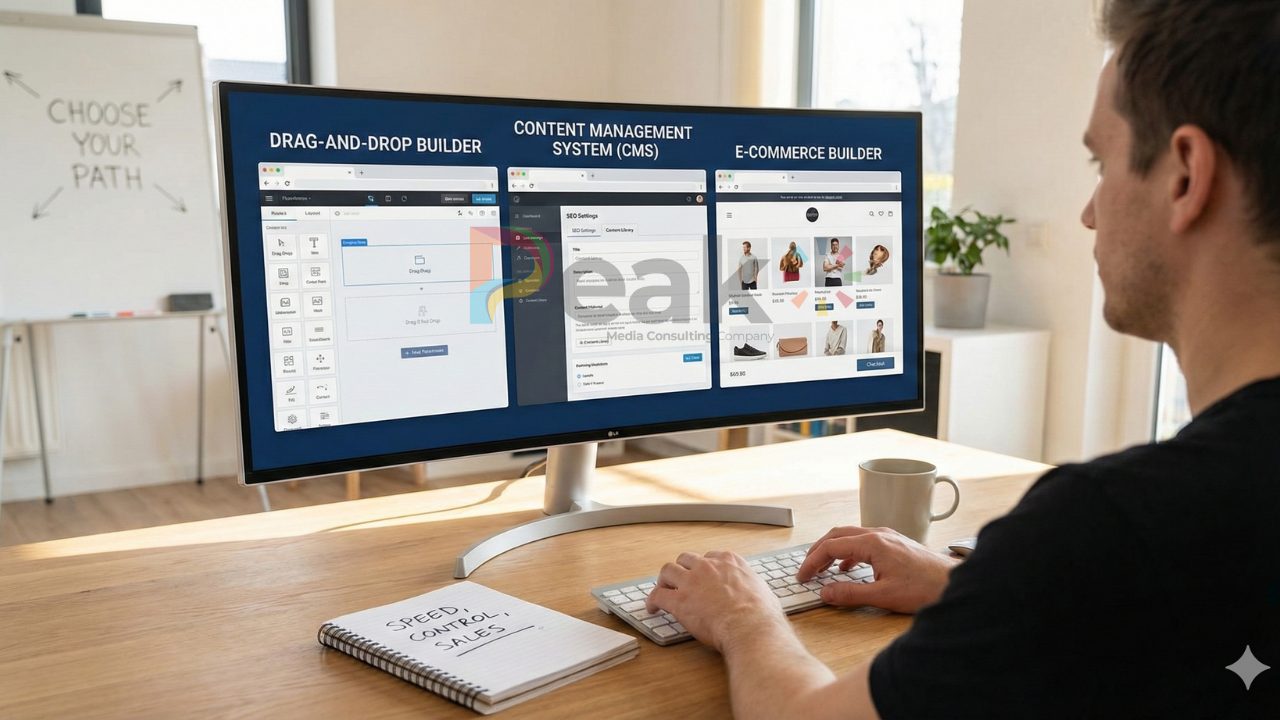
Website builders fall into a few clear categories. Each serves a different business need.
Drag-and-Drop Builders
Designed for speed and ease. No technical skills needed.
- Quick setup and built-in hosting
- Best for small service businesses
- Limited control over SEO and customisation
Content Management Systems (CMS)
are designed for adaptability and sustained expansion.
- Strong SEO and content control
- Scales well as the site grows
- Requires more setup and maintenance, which is why many businesses benefit from digital marketing services to maximize their CMS potential
E-Commerce Website Builders
Focused on selling products online.
- Payments, checkout, and inventory built in
- Higher monthly cost
- Less suited for content-heavy sites
Choose based on your goal:
Speed → Drag-and-drop
Control → CMS
Sales → E-commerce
How to Choose the Best Website Builder for Your Business
Most small businesses don’t fail because of a bad website. They fail because the builder they chose doesn’t match how the business actually operates. Use the criteria below to filter options logically, not emotionally.
Ease of Use & Learning Curve
If updating your site feels risky or slow, it will be neglected.
Look for:
- Simple page editing without breaking layouts
- Clear dashboard and editor structure
- Ability to publish changes quickly

A builder that’s hard to use creates dependency. That dependency costs time and money.
Design Flexibility & Brand Control
Templates should adapt to your brand, not restrict it.
Check whether you can:
- Adjust layouts beyond preset blocks
- Control fonts, spacing, and colors
- Optimize mobile views separately
Avoid builders that force design upgrades behind higher plans
Business-Critical Features (SEO, Sales, Bookings)
Features only matter if they drive results.
Prioritize builders that support:
- Full SEO control (titles, meta, URLs, speed)
- Lead capture forms and conversion tracking
- Payments, bookings, or product tools if needed
If core features rely on third-party add-ons, expect higher costs and more complexity.
Integrations, Analytics & Growth Tools
Your website should connect to your marketing stack.
Essential integrations include:
- Analytics and search tracking
- Email marketing and CRM tools
- Automation for forms and leads
Poor integration limits data, which weakens decisions.
Pricing, Trials & Long-Term Cost
Initial pricing is misleading. Focus on long-term value.
Evaluate:
- What features are locked behind upgrades
- Transaction or commission fees
- Cost as traffic or sales increase
A good builder scales predictably without punishing growth.
How We Evaluated Website Builders
Our evaluation focused on real business use, not marketing claims.
We tested each website builder on:
- Setup speed and ease of use
- Design flexibility and mobile performance
- SEO control and page speed
- Built-in business features (forms, payments, bookings)
We also assessed:
- Integration with analytics and marketing tools
- Quality of customer support
- Pricing transparency and upgrade costs
What we ignored:
- Promotional labels and feature overload
- Short-term discounts
- Brand popularity alone
Each builder was scored on how well it supports small business growth, not just website creation.
Best Website Builders for Small Businesses (Compared)
No single website builder is best for every business. The right choice depends on how you make money and how you plan to grow.
All-in-One Builders for Fast Setup
Best for service-based businesses that need to launch quickly.
- Easy setup with hosting included
- Built-in marketing and basic SEO tools
- Limited customization at scale
Ideal if speed and simplicity matter more than flexibility.
E-Commerce-Focused Platforms
Best for businesses that sell products online.
- Strong checkout and payment systems
- Inventory and order management built in
- Higher monthly costs
Choose these if online sales are your primary revenue source.
Flexible Builders for Long-Term Growth
Best for content-driven and SEO-focused businesses.
- Advanced SEO and design control
- Scales without rebuilding
- Requires more initial setup
This option suits businesses treating their website as a long-term asset.
Comparison Snapshot: Strengths & Trade-Offs
Every website builder solves one problem well and creates limitations elsewhere. This snapshot highlights what you gain and what you sacrifice with each approach.
All-in-One Builders
- Strengths: Fast setup, low learning curve, built-in tools
- Trade-offs: Limited SEO depth, restricted customization, platform lock-in
E-Commerce Platforms
- Strengths: Strong checkout, payments, inventory control
- Trade-offs: Higher costs, weaker content flexibility, design limits
Flexible / Scalable Builders
- Strengths: Advanced SEO, full design control, long-term scalability
- Trade-offs: More setup time, ongoing maintenance responsibility
Common Mistakes Small Businesses Make When Choosing a Builder
Most problems come from poor assumptions, not bad tools.
Choosing popularity over fit
A well-known builder may not support your business model or growth plans.
Overpaying for unused features
Many businesses upgrade plans they don’t actually need.
Ignoring SEO limitations early
Weak SEO control creates long-term traffic problems.
Locking into rigid templates
Design restrictions become painful as branding evolves.
Underestimating future growth
A builder that works today may force a rebuild tomorrow.
Key rule:
Choose for where your business is going—not just where it is now.
Final Recommendation & Next Steps
There is no universally “best” website builder—only the best fit for your business.
If you need speed and simplicity, choose an all-in-one builder.
If SEO and long-term growth matter, prioritize flexibility.
If sales drive your revenue, use a commerce-first platform.
Next steps:
- Define your primary goal (leads, sales, content)
- Shortlist builders that match that goal
- Test one platform before committing long-term
Decide once, decide logically, and avoid rebuilding later.
Best Website Builder For Small Businesses FAQs
What is the best free website builder for small businesses?
Free builders are useful for testing ideas, not for serious growth. They usually include ads, limited SEO control, and no custom domain. Good for experiments, not long-term business use.
Is Squarespace good for small businesses?
Squarespace works well for design-focused businesses and service providers. It offers strong templates and ease of use but limited flexibility compared to open platforms.
Which website builder is best for selling products online?
Shopify is the strongest option for online selling. It handles payments, inventory, and checkout better than general website builders.
Which website builder is best for SEO?
WordPress (self-hosted) provides the most SEO control. It allows full customization of site structure, speed, and advanced SEO tools.
Can I build a website for my small business for free?
Yes, but free sites lack credibility, branding control, and SEO power. A low-cost paid plan with a custom domain is usually a better investment.
What is the cheapest website builder for small businesses?
Budget builders and basic WordPress hosting are cost-effective. The key is looking at long-term costs, not just the entry price.
Is WordPress a good choice for small businesses?
Yes. WordPress is ideal for businesses that want scalability, SEO strength, and ownership. It requires more setup but avoids platform lock-in.
How long does it take to build a small business website?
Using a builder, a basic site can go live in a few days. More complex or content-heavy sites may take a few weeks.
Concluding Remarks
Alignment is more important when selecting a website builder than trends or brand names. The perfect platform supports your business’s present operations while enabling future expansion. Free and cheap builders could work well at first, but long-term success requires control, SEO power, and scalability.
You may prevent rebuilds, cut expenses, and transform your website into a true growth asset rather than a barrier when you match the builder to your business model—services, sales, or content.