
You’re ready to grow your brand with the best drag and drop website builder, and that starts with finding a platform that matches your goals and skill level. The best drag and drop website builder lets you launch a professional site without writing a single line of code. It empowers you to showcase your products or services, tell your story, and convert visitors into customers—all while you focus on running your business.
With so many options on the market, choosing the right platform can feel overwhelming. In this guide, you’ll learn how to evaluate builders, compare top contenders, design for your brand, optimize for growth, and launch with confidence.
Explore professional website development services to help you get started faster.
Evaluate Builder Features
Before you commit to a platform, make sure it offers the tools you need to support your brand now and as you grow.
Intuitive Interface
Look for a builder that keeps the learning curve low. An interface with clear toolbars, straightforward menus, and drag and drop elements helps you move quickly from blank canvas to polished site.
Design Templates
High-quality templates let you experiment with layouts and visual styles. Seek platforms with a wide range of professionally designed themes in your industry so you can start with a solid foundation.
Customization Options
Even with templates, you want freedom to tweak colors, fonts, spacing, and images. Robust customization tools let you refine every detail so your site feels uniquely yours.
E-commerce and Marketing Tools
If you plan to sell products or services, check for built-in shopping carts, payment gateways, inventory management, and tax calculators. Marketing features such as email capture forms, popups, and social media integrations can streamline your growth efforts.
Compare Popular Platforms
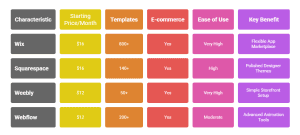
Here’s a quick rundown of leading drag and drop builders to help you weigh pros, cons, and pricing.
| Platform | Starting price/mo | Templates | E-commerce | Ease of use | Key benefit |
|---|---|---|---|---|---|
| Wix | $16 | 800+ | Yes | Very high | Flexible app marketplace |
| Squarespace | $16 | 140+ | Yes | High | Polished designer themes |
| Weebly | $12 | 50+ | Yes | Very high | Simple storefront setup |
| Webflow | $12 | 200+ | Yes | Moderate | Advanced animation tools |
Wix
Pros
-
Massive template and app library
-
Drag and drop editor with absolute positioning
-
Built-in SEO Wiz and site booster tools
Cons
-
Some templates can feel generic
-
Occasional performance lags on complex pages
Squarespace
Pros
-
Sleek, modern designs optimized for images
-
Excellent blogging and portfolio features
-
Integrated email campaigns
Cons
-
Less flexible layout controls
-
No free plan after trial
Weebly
Pros
-
Extremely beginner friendly
-
Free plan available
-
Affordable paid tiers
Cons
-
Limited design flexibility
-
Fewer marketing integrations
Webflow
Pros
-
Pixel-perfect design control
-
Advanced interactions and animations
-
CMS for dynamic content
Cons
-
Steeper learning curve
-
Pricing can climb for high-traffic sites
Design for Your Brand
Once you’ve chosen a builder, use these tips to create a website that reinforces your identity and resonates with your audience.
You can also check out Peak Media Consulting for expert website development and branding strategies.
Select Brand Elements
Gather your logo, brand colors, typography guidelines, and imagery. Upload these assets to your builder so you can apply them consistently across pages.
Maintain Visual Consistency
-
Use your primary brand color for buttons and calls to action
-
Stick to one or two typefaces for headings and body text
-
Keep image styles uniform—similar filters, borders, or aspect ratios
Consistency builds recognition and trust, making visitors feel more comfortable exploring your content.
Optimize for Growth
A great design is just the start. To attract, engage, and convert visitors, focus on performance, discoverability, and insights.
Improve Site Speed
-
Compress images before uploading
-
Minimize the number of third-party scripts
-
Choose a hosting plan that matches your traffic projections
Quick loading times reduce bounce rates and improve user satisfaction.
Enable Mobile Responsiveness
Most drag and drop builders automatically adjust layouts for mobile, but always preview and tweak:
-
Check button sizes and spacing for tap targets
-
Ensure text remains legible on small screens
-
Test forms and menus for usability
Leverage SEO Tools
Use your builder’s built-in SEO settings to:
-
Write descriptive page titles and meta descriptions
-
Add alt text to every image
-
Create an XML sitemap and submit it to search engines
These steps help Google and other search engines index your site more effectively.
Track Performance with Analytics
Connect Google Analytics or your builder’s analytics dashboard to monitor traffic, user behavior, and conversion rates. Data-driven insights guide your content strategy and marketing efforts.
Launch and Maintain
You’re almost there. Before you hit publish, follow this checklist to ensure a smooth launch and ongoing success.
Pre-launch Checklist
-
Proofread all text and double-check links
-
Test forms, checkout flows, and email notifications
-
Verify your domain settings and SSL certificate
-
Preview on desktop, tablet, and mobile devices
Ongoing Updates
-
Add fresh content regularly—blogs, case studies, portfolio updates
-
Review analytics monthly and adjust your strategy
-
Keep software, plugins, and integrations up to date
Consistent maintenance keeps your site secure, relevant, and engaging.
Key Takeaways
-
The best drag and drop website builder balances ease of use with advanced features
-
Compare platforms on templates, customization, pricing, and growth tools
-
Design with your brand’s colors, fonts, and imagery for a cohesive look
-
Optimize for speed, mobile, SEO, and analytics to drive traffic and conversions
-
Launch confidently with a thorough checklist and maintain momentum with regular updates
Ready to grow your brand?
Start with the best drag and drop website builder and build a site that works as hard as you do.